
The missing control panel for the Android Emulator.
Dark mode, font size, RTL, TalkBack, network speed and GPS: one click each, no adb commands. A Layout Inspector in dp, an accessibility audit, and an MCP server so AI agents can drive your emulator.
brew install --cask ateymoori/tap/oh-my-android- macOS 26 Tahoe or later
- Apple silicon
- Signed and notarized
- MIT license
The problem
Testing an Android app means the same chores, over and over.
Switch to dark mode. Make the font huge. Change the language to Arabic to check RTL. Turn on TalkBack. Throttle the network to 3G. Each is buried in settings or needs an adb shell command you look up again. Oh My Android puts all of them in a floating panel next to the emulator. Every icon shows the device's real state, and one click changes it.
Appearance
Dark mode, font scale from 0.85× to 2×, display size, locale with RTL and pseudo-locales, rotation.
Your app
Restart, clear data, open a deep link, install an APK by drag and drop, reset permissions, force stop.
Network
Emulate LTE, 3G, EDGE or GPRS speed and latency. Airplane mode, Wi‑Fi and mobile data toggles.
Accessibility
TalkBack on and off, bold text, inverted colors, and an audit of TalkBack order and touch targets.
Simulate
GPS by city or coordinates, battery level and charging, fingerprint, incoming call and SMS.
Capture and snapshots
Screenshots copied to the clipboard, screen recording with audio, and emulator snapshots you restore in seconds.
Features in depth
Layout Inspector
Measure any screen in dp, like in Figma.
Freeze the screen and hover any element to see its size in dp. Click one, hover another, and read the distance between them. Works with Jetpack Compose and classic Views.
- 8 dp grid, color picker and estimated text size in sp
- Drop a Figma export on top and compare pixel by pixel
- Press ⇧⌘A for a TalkBack order and touch-target audit
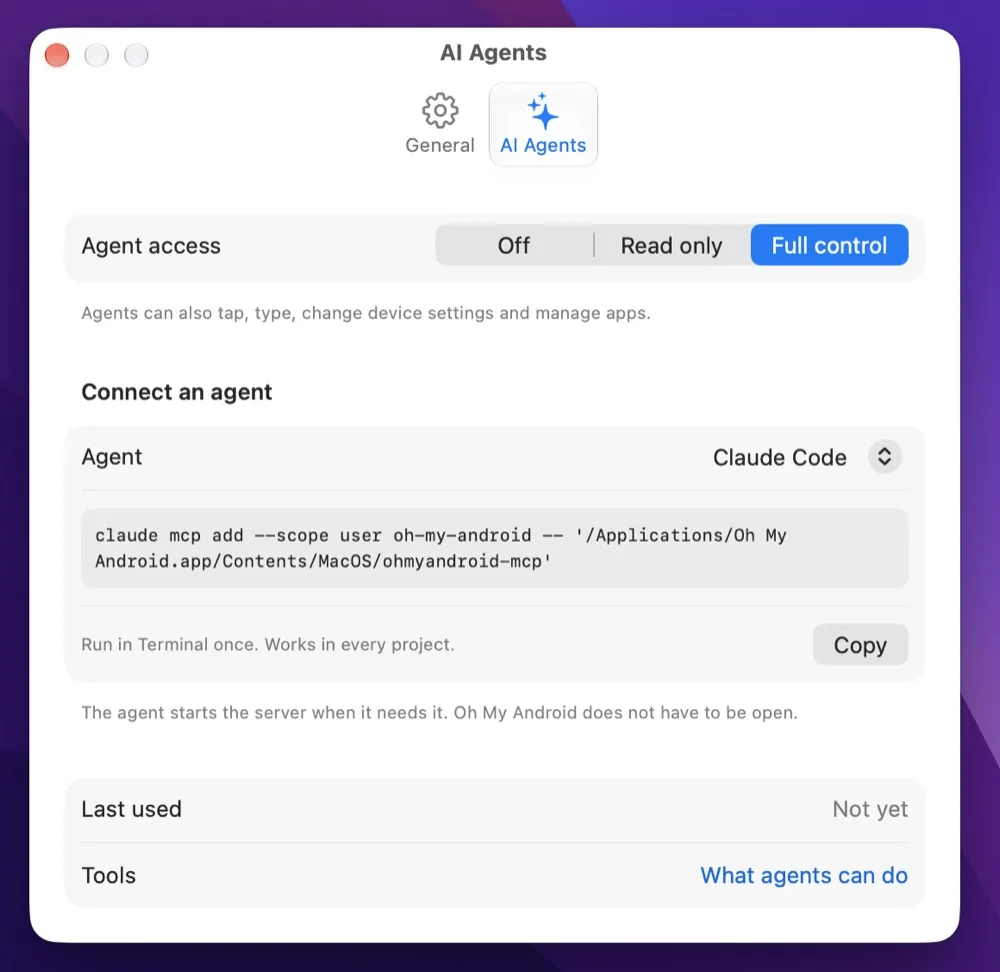
AI agents (MCP)
Your coding agent can see and drive the emulator.
A built-in Model Context Protocol server gives Claude Code, Codex, Cursor and VS Code 18 tools: take a screenshot, read the UI tree in dp, tap and type, switch to dark mode or RTL, read logcat and the app's database. The agent builds a screen, runs it, looks at the result and fixes it.
- Access is Off, Read only or Full control, checked on every call
- A UI tree about 10× smaller than raw uiautomator XML
- All 18 tool definitions fit in about 3k tokens
- One native binary: no runtime, no network
# Claude Code
claude mcp add --scope user oh-my-android -- ohmyandroid-mcp
# Codex CLI
codex mcp add oh-my-android -- ohmyandroid-mcp
No more adb commands
Every icon replaces a command you would otherwise look up.
| Task | The adb way | Oh My Android |
|---|---|---|
| Dark mode | adb shell cmd uimode night yes | One click |
| Bigger font | adb shell settings put system font_scale 1.3 | Aa − / + |
| Test RTL layout | adb shell cmd locale set-device-locale ar-EG | Pick from a menu |
| Slow network | adb emu network speed edge | Pick a profile |
| Mock GPS in Stockholm | adb emu geo fix 18.0686 59.3293 | Pick a city |
| Animations off for UI tests | 3 × adb shell settings put global …_scale 0 | One click |
| Clear app data | adb shell pm clear <package> | One click |
| Screenshot | adb exec-out screencap -p > shot.png | Saved and copied |
Screenshots
Native SwiftUI, light on the battery.
Event-driven, no Electron, no telemetry. The only network request is an optional daily update check, and updates install only when you choose.
FAQ
Questions about Oh My Android.
Is Oh My Android free?
Yes. It is free and open source under the MIT license.
Does it replace Android Studio or the Android Emulator?
No. It is a companion that controls Google's emulator and your phones through the Android SDK you already have. It bundles no emulator and no SDK.
Does it work with a real Android phone?
Yes, over USB or Wi‑Fi adb. Only emulator-only actions such as GPS, battery, calls, SMS, snapshots and network speed need an emulator.
Does it work with Jetpack Compose?
Yes. The Layout Inspector and the accessibility audit read the Compose semantics tree through uiautomator, the same as for Views.
Which AI agents can use the MCP server?
Any agent that supports MCP over stdio, including Claude Code, Claude Desktop, Codex CLI, Cursor, VS Code with GitHub Copilot, Windsurf and Gemini CLI.
Why is it not in the Mac App Store?
Mac App Store apps must run in the App Sandbox, and a sandboxed app cannot start adb. Releases on Homebrew and GitHub are signed and notarized by Apple instead.